Icon of program: Q-Dir

Q-Dir for Windows

  • Free
  • 4.5
    591
  • 252.4K
  • V12.68
Free Download for Windows

View an ad to download for free

Cathy Buggs

Updated 2 months ago

Four folders, one tidy command center

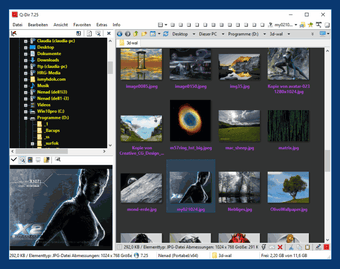
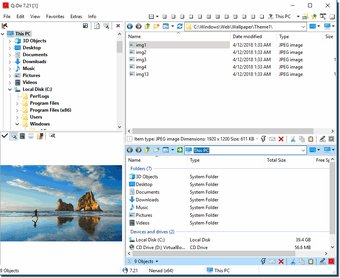
Q-Dir, developed by SoftwareOK, is a free file manager built around a multi-pane interface for heavy file handling. It provides up to four independent directory panes, plus tabs, to compare, move, and copy items across local folders, ZIP files, FTP locations, and network folders. The app fits power users, system administrators, and developers who manage large file sets across several paths at once.

Top Recommended Alternative

Four panes beat four open windows

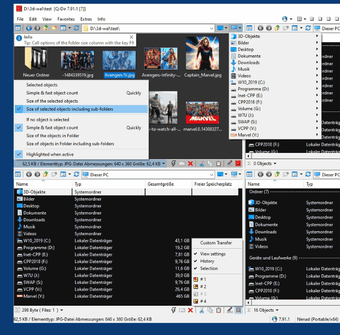
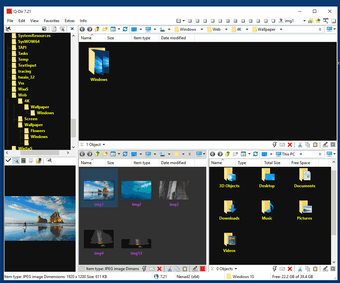
Q-Dir centralizes multi-folder access by showing up to four independent panes with tabbed browsing inside each one. This directly supports cross-drive copying, folder comparison, and cleanup tasks without juggling separate file windows. For development workflows, the layout helps when moving build artifacts, checking project folders, or comparing local and network directories from one compact workspace.

Portable enough for the USB toolkit

The app runs as a portable file manager and supports familiar file operations while staying lightweight. Its portable mode helps technicians and admins carry it on a USB stick without a full installation, while quick-link bookmarks keep frequent system paths close. The trade-off is visual: Q-Dir keeps a classic desktop style that can feel dense or dated beside newer file managers.

Small utility, surprisingly busy toolbox

Q-Dir keeps resource use low while offering flexible layouts, color filters, drag-and-drop handling, file list export, and optional screen magnifier tools. Developers handling large repositories or temporary folders can switch between pane arrangements instead of rebuilding the same workspace repeatedly. However, users who want a modern, simplified interface can find the many panes, tabs, and controls busy at first.

Best for people who live in folders

Q-Dir is a practical multi-pane file manager for users who care more about speed, portability, and folder control than visual polish. Its quad-pane layout and lightweight design make it useful for technical file work, including development-adjacent tasks. It is not a coding tool, but it earns its place in a developer toolkit when file organization becomes part of the job.


Cathy Buggs

With decades of experience in IT management and later as a writer and tutor, she combines technical knowledge with a passion for clear communication. His work spans editing, teaching, and writing, bringing authority and precision to content on technology and related fields.

  • Pros

    • Quad-pane layout supports faster multi-folder file handling
    • Portable and lightweight enough for technical toolkits
  • Cons

    • Classic interface can feel dense or dated
    • Development tag is only a secondary fit, not the app’s core category
 0/4

App specs

Program available in other languages


Icon of program: Q-Dir

Q-Dir for PC

  • Free
  • 4.5
    591
  • 252.4K
  • V12.68
Free Download for PC

View an ad to download for free


User reviews about Q-Dir

4.5

5 reviews

Add review

Main reviews for you

  • Anonymous user

    I dunno... looks a lot like Total Commander which I've been using for last 25 years...Did you rip off Total Commander? ;)

  • Anonymous user

    Basically, It's good, but look at Total commander. Some cool and very efficient features missing. I.e. efficient configurable search etc BR and keep god work

  • Anonymous user

    Once you use it you got it FOREVER.. Not a bad program but decided it was not for me. BUT after deleting this supposedly portable program's files I found numerous registry entries I am still working to eliminate. Since its portable none of my uninstallers see it. You better like this program cause you may very well have it forever. Pros: works OK Cons: No way to remove portable program

  • Anonymous user

    Q-Dir is an inferior application. I read all the reviews thinking "wow, this application is so useful and yet it's free." I went ahead to download and install it. Well, sometimes you have to actually use one to verify for yourselve. I verified it myself and decided to uninstall the good-for-nothing application. It never worked. It froze each time I try to experiment to see how good it was with lots and lots of reviews.

  • Anonymous user

    More... qdir is the best one!!! but, add more explorers.. like 4-6-8.. and the window apearence the same as the operational system.. Pros: more than one explorer =P Cons: more explorers;apearence..control c - control v doesn't work if you want to paste in a normal explorer window and the program is not open..

More

You may also like

Alternatives to Q-Dir

Explore Apps

Latest articles

Laws concerning the use of this software vary from country to country. We do not encourage or condone the use of this program if it is in violation of these laws.
Softonic

Is Q-Dir safe?

99/100

Score result: Clean

This file passed a comprehensive security scan using VirusTotal technology. It is safe to download.

  • Virus free
  • Spyware free
  • Malware free
  • Verified by Security Partners

    VirusTotal logo

Scan Info

Last scan
Tuesday, June 23, 2026
Scan provider
VirusTotal · Full report

File Integrity

File
12.68.zip
SHA256
123ed79b5d3e21b9edb377442cfee3048717b37444490bf66b76221d7ecd61ac
SHA1
eebff7b37ad044d44acaee15c1d35daddcd47514

Softonic security commitment

Q-Dir has been thoroughly scanned by our advanced security systems and verified by industry-leading partners. This file comes from the official developer and has passed all our security checks, showing no signs of viruses, malware, or spyware. For more information, visit our Security and Trust Center

Signed in to Softonic as